
Count Artisan 匠: Tally Counter
Visit
1 upvotes
Count Artisan 匠: Tally Counter
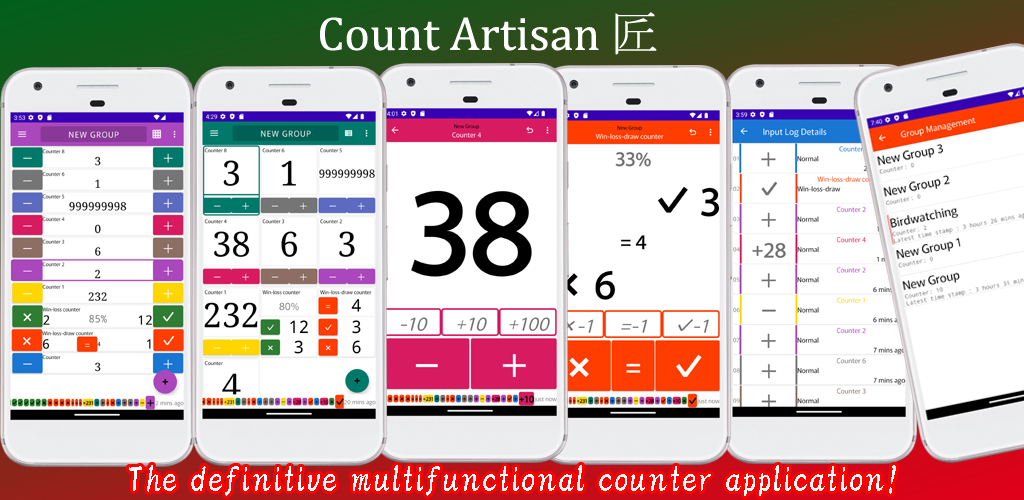
Never wonder "Did I just count that?" ever again.
We’ve all been there—clicking a counter and immediately doubting if the increment actually happened. While many apps offer history logs, "Count Artisan 匠" changes the game by displaying your recent activity and timestamps directly on the counting screen in real-time. No need to switch tabs or open menus. You can see exactly when and what you counted at a glance, supporting high-precision tracking for users who need to minimize errors.
From complex inventory management to fast-paced sports scoring and fitness tracking, this is the only tally tool you’ll ever need.
■ Eliminate Errors & Missed Counts
"Did I double-tap by mistake?"
"Was my last count 10 seconds ago or just now?"
Common counting anxiety is solved here. By visualizing your input history as you count, you can spot and correct errors the moment they happen.
■ The All-in-One Solution
Why clutter your phone with multiple single-purpose apps? Whether you need a simple tally, a 1v1 scoreboard, or a complex win/loss/draw tracker, this app handles it all in one intuitive interface.
■ Key Features
Precision Support: Real-time history summary with timestamps displayed during active counting.
Instant Undo: Quickly correct accidental taps with a dedicated undo function.
Versatile Counter Types: Supports simple tallies, win/loss records, 1v1 live scores, and win/loss/draw formats.
Powerfully Customizable: Set custom increments, initial values, limits, and auto-reset rules. Add extra custom buttons for frequent jumps (e.g., +5, +10).
Data Portability: Export your data to Text or CSV for professional analysis.
Advanced Organization: Group management, drag-and-drop reordering, and smart auto-coloring for instant identification.
Dark Mode: Battery-friendly and easy on the eyes for long counting sessions.
■ Perfect For:
Precision Seekers: Users who need to verify every single increment via the on-screen history summary.
Multi-Taskers: People who need to track different metrics simultaneously—like counting specific sports techniques while managing the overall match score and win rate.
Data-Driven Users: Those who need timestamps and CSV exports for inventory, scientific observations, or habit tracking.